

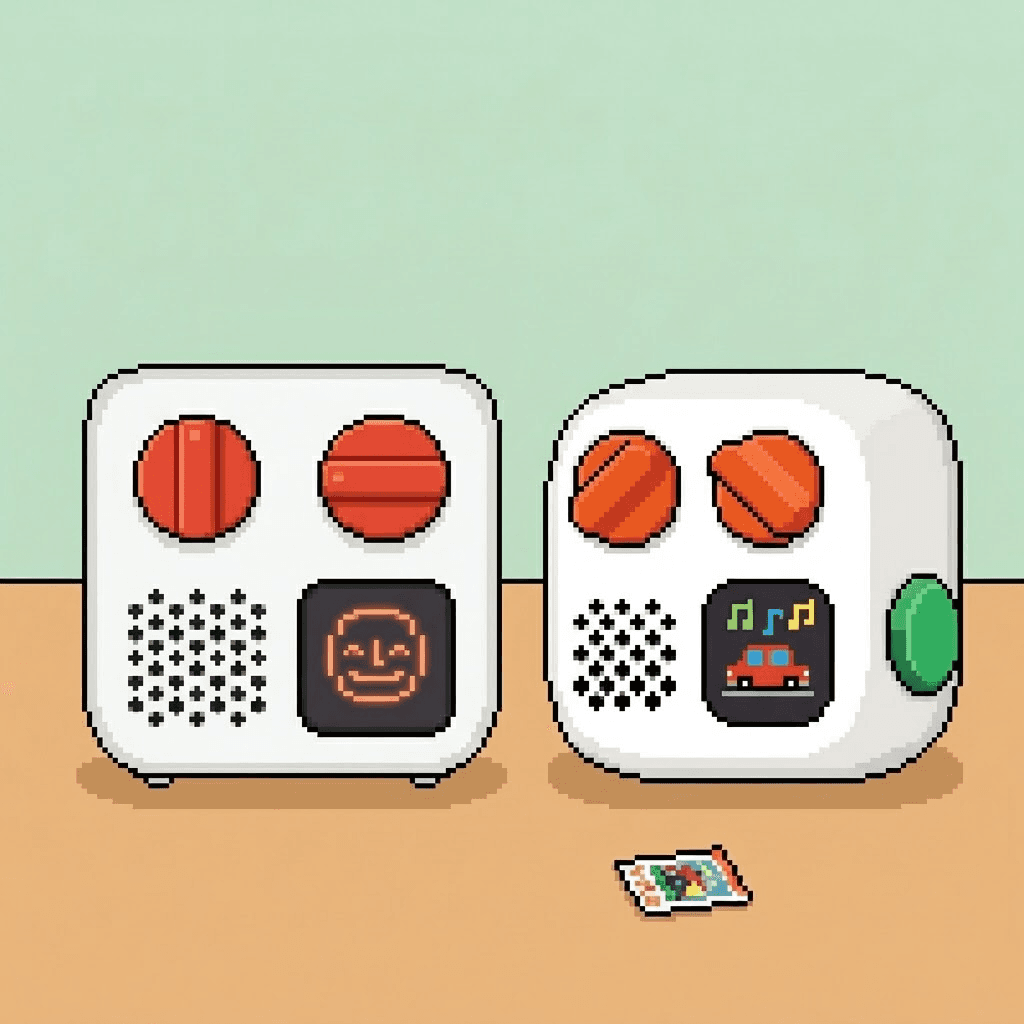
I found out about the Yoto 4th Gen at ten at night, from a push notification. Yoto had announced new versions of both players that day, 10 September, and it caught me mid-plan: my daughter turns three in a few months, and the full-size Player is what I have in mind for her birthday. She started on the Mini, and the post about that choice ends with that idea.
Nothing is decided, but if it is a Player, it will now probably be this one. I have not held a 4th Gen yet. What follows is from Yoto's product pages, checked on 14 September 2026, and from studying the photos. If I do buy one, this post gets updated.
What's new, in short
- The Green Button, which plays a list of favourites with no card.
- A new, chubbier design, and a Player whose whole front panel lights up.
- 64GB of storage, double the previous players.
- A waterproof Mini, rated IP67.
- Higher prices and slightly shorter battery life.
The Green Button
A Yoto could already play some things without a card, like radio and podcasts. What it could not do was let a child pick their own favourites without one. The Green Button does that. In the Yoto app you pick up to 20 titles - stories, songs, podcasts, radio, sleep sounds, your own recordings - and your child twists the button to browse them and presses it to play. There is one list for the day and one for the night, each player has its own, and it all works offline once downloaded.
The obvious win is the lost card. The favourite card is always the one that has disappeared, usually at bedtime, usually under the sofa. With the favourites living inside the player, that search is over.
I am less sure it replaces cards, and I do not want it to. Posting a card is how my daughter learned to run the Yoto on her own at two. Twisting through twenty items is a different skill. My guess is a child would use both.
The design
This is the part I like most. The 4th Gen is chubby. The old Player was a neat box with rounded edges; the new one looks puffed up, as if someone inflated it slightly, and every corner has gone soft. It looks less like a speaker and more like a toy - something a three-year-old wants to pick up and hug.
The Player's front now works as a full-panel nightlight in seven colours, which should make it a clear okay-to-wake light from across a dark room. The Mini keeps its small size and gains an IP67 rating: it survives a metre of water for 30 minutes. For a player that goes to the bath, the beach and the bottom of the nappy bag, that matters more than any spec. There are also four new Adventure Jacket colours.
What it costs, and what got worse
The price went up: $40 on the Player and $30 on the Mini, or £119.99 and £89.99 in the UK. The battery went down by two hours on each. For a Player that lives on a bedside table and charges every night, that makes no difference. For long car journeys with the Mini, it is worth knowing.
The full comparison, in US figures from Yoto's product pages. The previous-generation numbers are the ones from the Mini comparison in August.
| Mini, previous | Mini 4th Gen | Player 3rd Gen | Player 4th Gen | |
|---|---|---|---|---|
| Price | $79.99 | $109.99 | $109.99 | $149.99 |
| Battery | up to 14 hours | up to 12 hours | up to 16 hours | up to 14 hours |
| Storage | 32GB | 64GB | 32GB | 64GB |
| Green Button | no | yes | no | yes |
| Charging | USB-C | USB-C | dock, or USB-C | USB-C, or wireless |
Both new players also move to Wi-Fi 6 and Bluetooth 6.1.
Will your cards and icons still work?
Almost all cards will, according to Yoto. Some interactive cards do not work on the 4th Gen yet, and support is promised. A card collection is not wasted by upgrading.
The first thing I would test is Make Your Own cards with custom icons, for obvious reasons. Yoto still describes pixel icons for navigating tracks, so I expect the 16×16 format to carry over. I will not promise it until I have seen my own Yoto icons on the new screen.
Should you upgrade?
If you already have a working Yoto, no. Cards, the app and Make Your Own all keep working, and Yoto says older players will keep getting software updates where possible. The Green Button is nice, not essential.
If you are buying a first Yoto, or a present, buy the 4th Gen. The price difference is real, but the player will be in the house for years, and a feature like the Green Button becomes normal very quickly.
Some links here earn us a small commission if you buy. It costs you nothing and it does not decide what goes on this page — the things we think are not worth the money are listed as exactly that. As an Amazon Associate we earn from qualifying purchases.
The Yoto Mini 4th Gen is also sold on Amazon.
Why I am probably buying the Player
It would be a present, not an upgrade, so the advice above applies. At three she will be old enough to read the screen from across the room, most of her listening happens at bedtime, and the new nightlight would cover the okay-to-wake job as well. Whatever happens, the Mini stays - it is the one that travels.
Pre-orders are open now. Yoto estimates the Mini ships from 30 September and the Player from 15 October, and warns that early Player stock is limited. Her birthday is far enough away that I can wait for the first real reviews, and see whether that chubby design is as nice in person.
Quick answers
- What is new in the Yoto Player 4th Gen?
- The Green Button, a cardless favourites list of up to 20 titles for day and 20 for night. Also 64GB of storage, Wi-Fi 6, Bluetooth 6.1, wireless charging and a full-panel nightlight in seven colours.
- What is the Yoto Green Button?
- A button on the 4th Gen players that plays a list of favourites without a card. A parent picks up to 20 titles in the app, separately for day and night. The child twists to browse and presses to play.
- How much does the Yoto Player 4th Gen cost?
- $149.99, £119.99 or €129.99 at launch. The Mini 4th Gen is $109.99, £89.99 or €99.99. Both are $30 to $40 more than the generation before.
- When does the Yoto Player 4th Gen ship?
- Pre-orders opened on 10 September 2026. Yoto estimates dispatch from 30 September for the Mini and 15 October for the Player, and says early Player stock will be limited.
- Do old Yoto cards work on the 4th Gen?
- Almost all of them, Yoto says. Some interactive cards do not work yet, with support promised later.
- Should I upgrade my 3rd Gen Yoto?
- Not unless you want the Green Button badly. Cards, the app and Make Your Own all keep working on the older players. The new ones make most sense as a first player or a present.